How to Spot AI-Generated Images: Artifacts, Detection Methods & Defenses (2026)
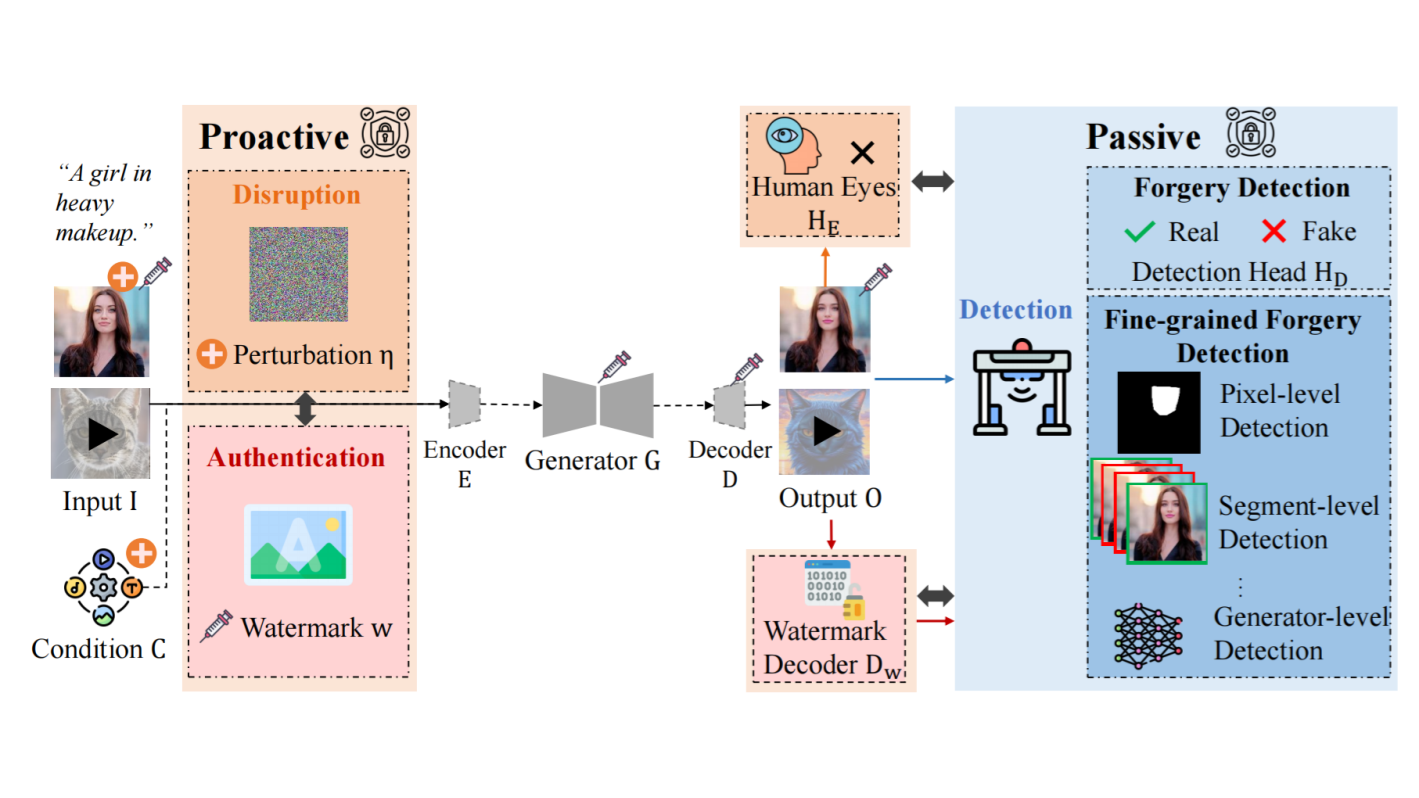
How do you spot AI-generated images when they look this real? Diffusion models, GANs, and their variants now produce photos that fool most people — and they're being used for misinformation, identity fraud, and copyright theft at scale.
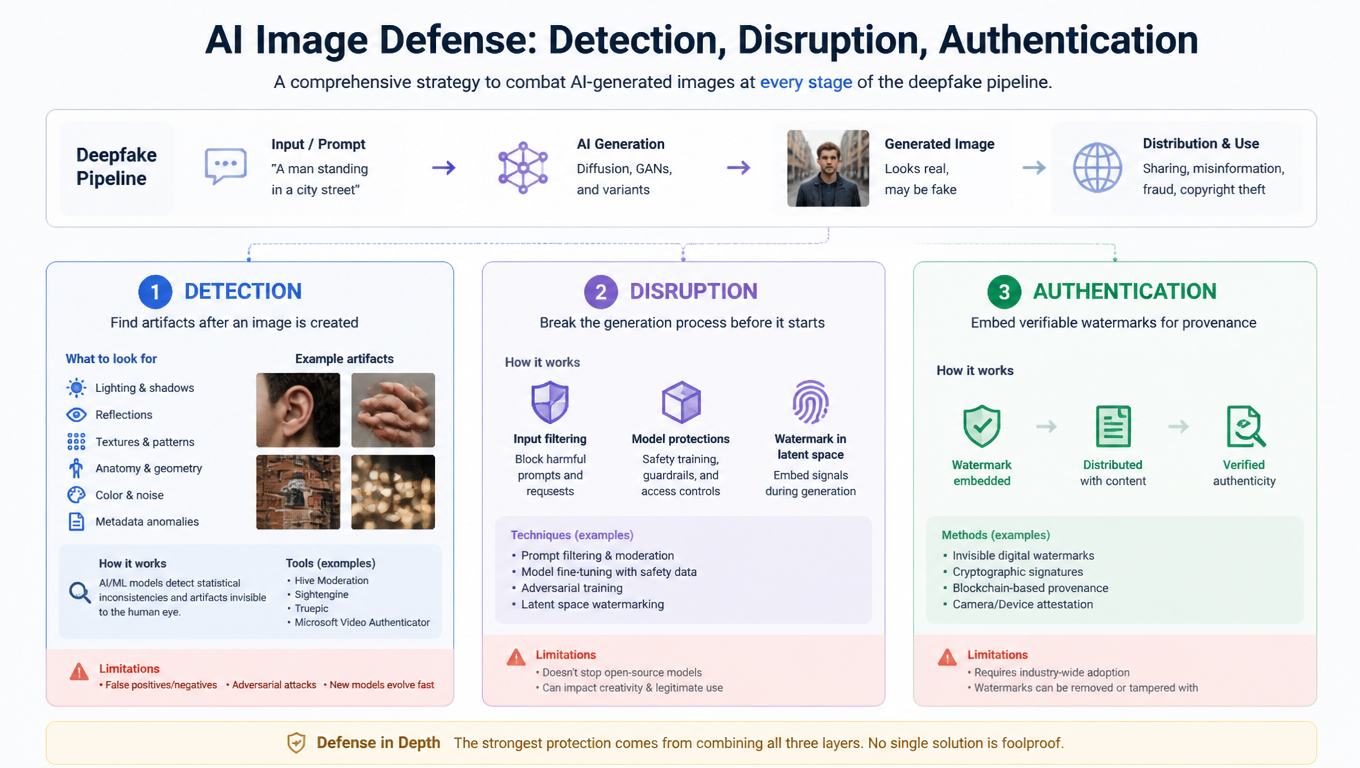
A recent survey ("A Survey of Defenses against AI-generated Visual Media") breaks the problem into three layers of defense: detection (finding artifacts after an image is created), disruption (breaking the generation process before it starts), and authentication (embedding verifiable watermarks for provenance). Each targets a different stage of the deepfake pipeline.
Below, we walk through the AI image detection methods that actually work in 2026 — what artifacts to look for, how the tools work, and where they still fall short. Looking for a quicker, hands-on guide? Start with our companion article: How to Detect AI-Generated Images: 5 Checks Anyone Can Do.
1. AI Image Detection Methods: How to Spot Artifacts in Generated Photos
This is the approach most people think of first — and the core of how AI image detectors work. You have a photo or video and you want to know: is it real? Detection tools scan for artifacts that are invisible to the naked eye but statistically distinct from real photos.
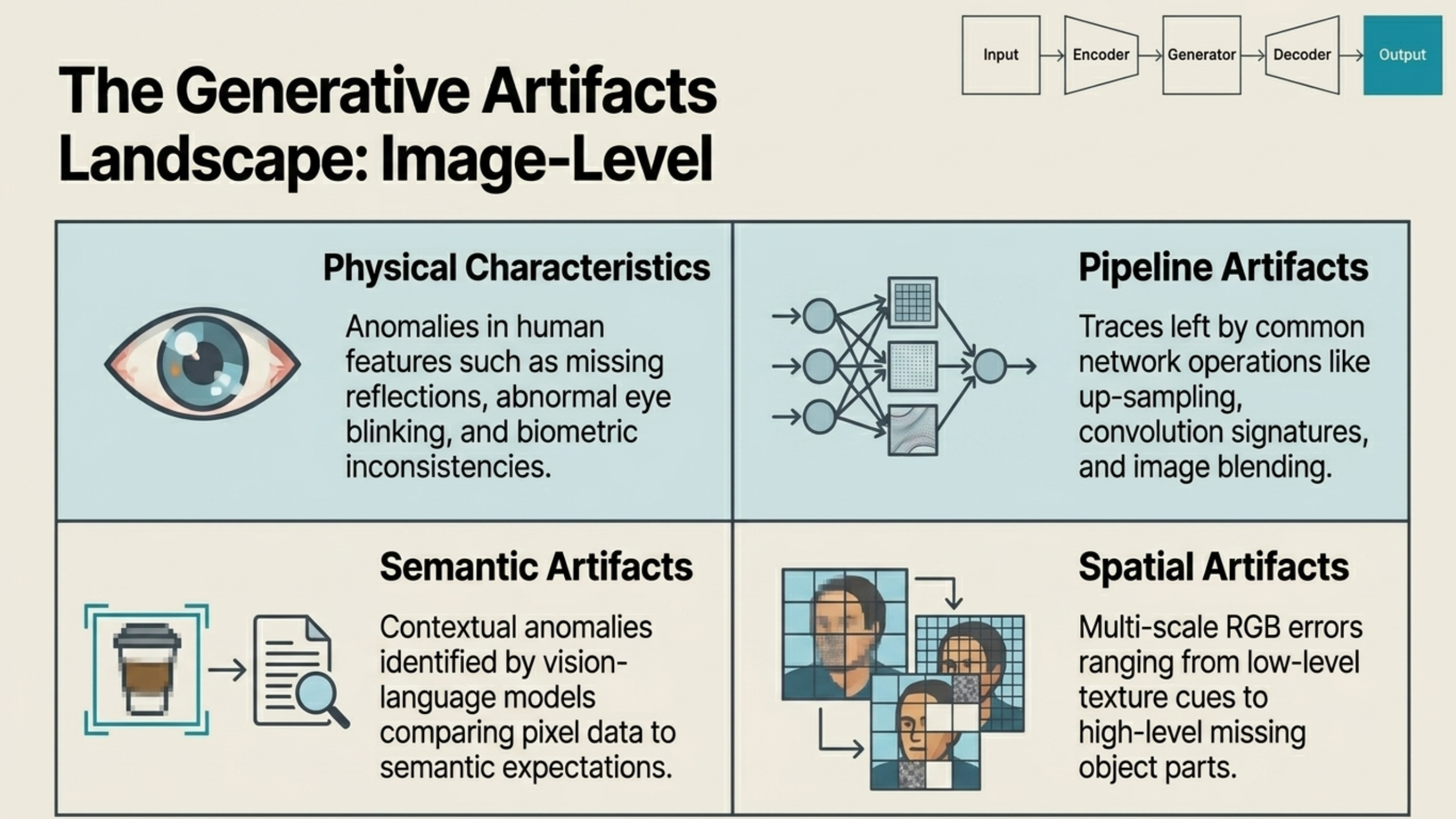
According to the survey, detectors look for four main categories of clues:
- Physical artifacts. AI still makes mistakes with human biology — mismatched eye reflections, inconsistent pupil shapes, overly smooth skin, or impossible lighting on faces. These are the easiest to spot visually, but newer models are getting better at avoiding them.
- Pipeline artifacts. Every generative model has an architecture — upsampling layers, convolution operations, noise schedules. These processing steps leave traces in the pixel data. For example, upsampling can create repeating patterns in the frequency spectrum that a real camera sensor would never produce.
- Spatial artifacts. At a pixel level, AI-generated images often show texture inconsistencies: edges that are too clean, background details that don't hold up under zoom, or object parts that subtly break physical rules.
- Semantic artifacts. Sometimes the image looks fine pixel-by-pixel, but doesn't make sense as a scene. Vision-language models can catch these — a caption that doesn't match the visual content, or objects arranged in ways that don't occur naturally.
For video deepfakes, there's a fifth dimension: temporal consistency. Detectors look for frame-to-frame glitches like lip sync drifting off audio, or subtle lighting jumps between consecutive frames. To see how these artifacts play out in real-world detection tests, read: Can AI Detectors Catch OpenAI's Latest Images? We Tested It.
Want to try it? Drop any image into our free AI image detector — it analyzes pixel patterns and frequency artifacts in seconds. No signup, no data stored.
2. Disruption: Stopping AI-Generated Fakes Before They Exist
Detection is reactive — it only works after a fake already exists. Disruption flips the approach: it tries to make deepfake generation fail in the first place.
The technique works by adding tiny, imperceptible perturbations to your photos before you share them online. To anyone looking at the image, it appears completely normal. But if someone downloads it and feeds it into a generative model — say, to swap your face onto another body — those perturbations interfere with the model's internal processing. The output comes out distorted or broken.
In practice, this means you could protect your profile photos before posting them. They'd look exactly the same on social media, but any attempt to use them as deepfake source material would fail. The perturbations essentially act as invisible interference that only activates inside a generative pipeline.
The challenge? These perturbations need to be specifically designed for the target model architecture. As generators evolve, disruption tools need to keep up.
3. Watermarking & Authentication: Proving an Image Is Real
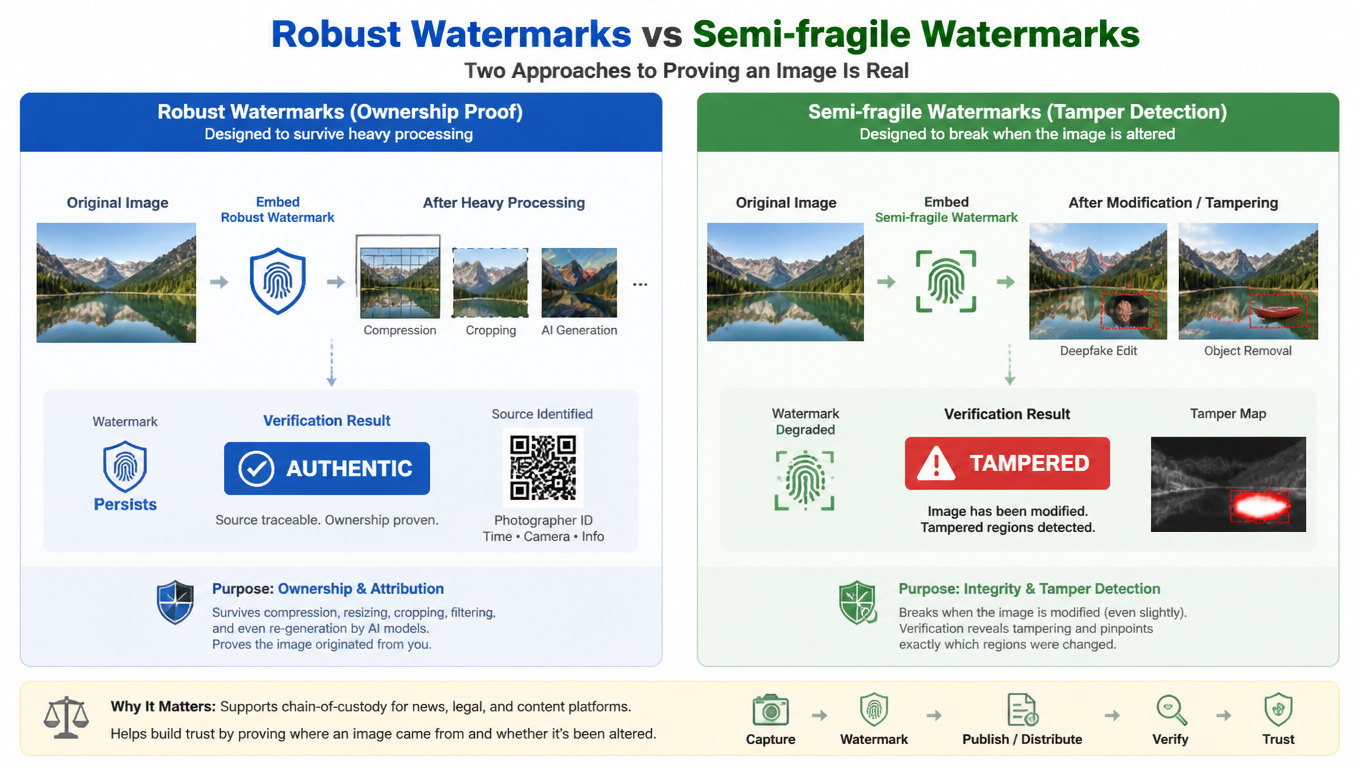
The third strategy focuses on provenance — proving where an image came from and whether it's been altered. This is done by embedding invisible digital watermarks before an image is published.
There are two distinct approaches:
- Robust watermarks (ownership proof). These are designed to survive heavy processing — compression, cropping, even being run through another AI model. If a photographer watermarks their work and that work later appears in someone else's AI-generated output, the watermark persists as traceable evidence of the original source.
- Semi-fragile watermarks (tamper detection). These are deliberately easy to break. Embed one in an authentic photo, and if someone modifies that photo with a deepfake tool, the watermark degrades. A verification scan can then flag the image as tampered and highlight exactly which regions were altered.
The authentication approach is especially relevant for news organizations and content platforms that need a chain-of-custody model for media.
Why These AI Detection Methods Still Fail
All three defenses work, but none of them is fully reliable yet. The survey highlights trustworthiness as the critical gap:
- Adversarial attacks can target each defense. Attackers can craft inputs that fool detectors into classifying fakes as real, strip watermarks through careful image processing, or design perturbations that neutralize disruption noise.
- Fairness bias. Some detection models perform unevenly across demographic groups — accuracy varies by skin tone, gender, and age. This isn't just a technical issue; it has real consequences for who gets falsely accused or overlooked.
- Generalization. A detector trained on GAN-generated images may miss outputs from diffusion models entirely. Cross-architecture robustness is still an active research problem.
For a real-world look at how detection performs against the newest AI models, including fairness and generalization challenges, see: Can Deepfakes Fool Face ID? How AI Is Breaking Facial Recognition.
How to Check If a Photo Is AI-Generated Right Now
No single tool handles everything, but layering these defenses is practical right now:
- Run a quick visual check — look for the common tells like mismatched eye reflections, weird hands, or "too perfect" skin. Our practical detection guide walks through 5 specific things to check.
- Use a detection tool — upload the image to an AI image detector that combines multiple analysis engines. A multi-engine approach catches things that single-method tools miss.
- Check provenance — look for C2PA content credentials or embedded watermarks. Major platforms are starting to adopt these standards.
- Stay skeptical. If a photo seems too dramatic, too perfect, or too conveniently timed — pause before you share it.
A quick scan takes seconds. Try it free at isthisaiphoto.com — no signup, no data stored, instant results.
Frequently Asked Questions
What are the most reliable artifacts for detecting AI-generated images?
The most reliable detection signals are frequency domain artifacts (periodic patterns from upsampling in Fourier transforms) and noise signatures (AI-generated images have mathematically clean noise that differs from real camera sensor noise). These are hard for generators to eliminate because they're baked into the generation pipeline itself.
What is the difference between detection, disruption, and authentication?
Detection finds artifacts after an image is created (reactive). Disruption adds invisible perturbations to photos before sharing, so any attempt to use them for deepfakes produces distorted output (preventive). Authentication embeds verifiable watermarks for provenance — proving where an image came from and whether it's been tampered with (evidentiary). Each targets a different stage of the deepfake pipeline.
Can AI detection tools be fooled by adversarial attacks?
Yes, this is a known vulnerability. Adversarial attacks can craft inputs that fool detectors into classifying fakes as real. This is why multi-engine detection — combining frequency analysis, noise signatures, texture analysis, and model fingerprinting — is more robust than any single-method approach. No defense is 100% reliable, but layering methods significantly raises the bar for attackers.
Is C2PA the future of image authentication?
C2PA (Content Credentials) is the leading standard for content provenance and is being adopted by major platforms, camera manufacturers, and news organizations. It embeds verifiable metadata showing where an image was created, by whom, and whether it's been edited. While not yet universal, C2PA adoption is accelerating and represents the strongest path toward verifiable media provenance.
Spot something suspicious? Check it in seconds — isthisaiphoto.com is free, private, and works on images from any AI model. No signup required.
Related Reading
- How to Detect AI-Generated Images: 5 Checks Anyone Can Do — A practical, step-by-step guide with visual checks and scenario-specific tips.
- Can Deepfakes Fool Face ID? How AI Is Breaking Facial Recognition — How deepfakes are breaking facial recognition and what's being done about it.
- Can AI Detectors Catch OpenAI's Latest Images? We Tested It — Real-world detection test results against the newest AI generators.