How to Detect AI-Generated Images: 5 Checks Anyone Can Do (2026)
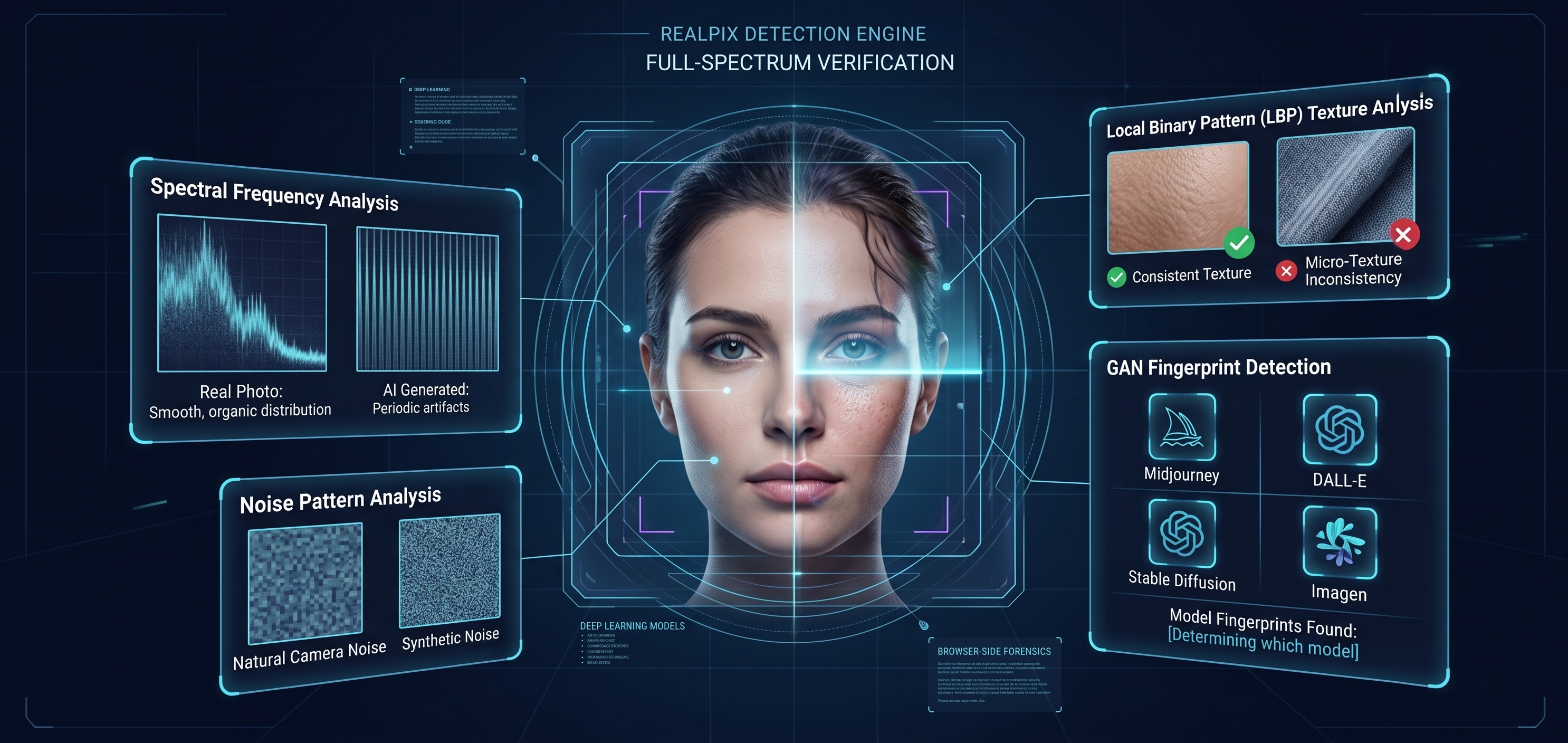
A photo shows up in your feed. It looks real — good lighting, natural pose, believable background. But something feels slightly off, and you can't quite put your finger on it.
That gut feeling is worth paying attention to. In 2026, AI image generators like Midjourney, DALL-E 3, Stable Diffusion XL, and Google's Imagen now produce photos that are genuinely hard to distinguish from real ones. They're being used to create fake dating profiles, fabricate news events, generate fraudulent product listings, and impersonate real people.
The good news: AI images aren't perfect yet. They leave traces — some visible, some hidden in the pixel data — and there are reliable ways to catch them. Below, we walk through the five visual checks anyone can do, plus how automated AI image detection tools work when your eyes aren't enough.
Why Detecting AI-Generated Images Matters More Than You Think
It's easy to assume AI fakes are someone else's problem. But they're already showing up in places that affect everyday decisions:
- Online dating. AI-generated profile photos are now common on dating apps. If the person you're talking to doesn't exist, you want to know before things go further.
- News and social media. Fake event photos spread fast. During elections or crises, a single AI-generated image can shape public opinion before anyone fact-checks it.
- E-commerce. Some sellers use AI models wearing AI clothing to sell products that look nothing like what arrives in the mail.
- Job applications and identity fraud. Fake headshots are being used to create synthetic identities for scams, remote job fraud, and even financial crimes.
For a deeper look at how detection, disruption, and authentication work together as defense layers against AI-generated fakes, read: How to Spot AI-Generated Images: Artifacts, Detection Methods & Defenses.
5 Visual Checks You Can Do Right Now
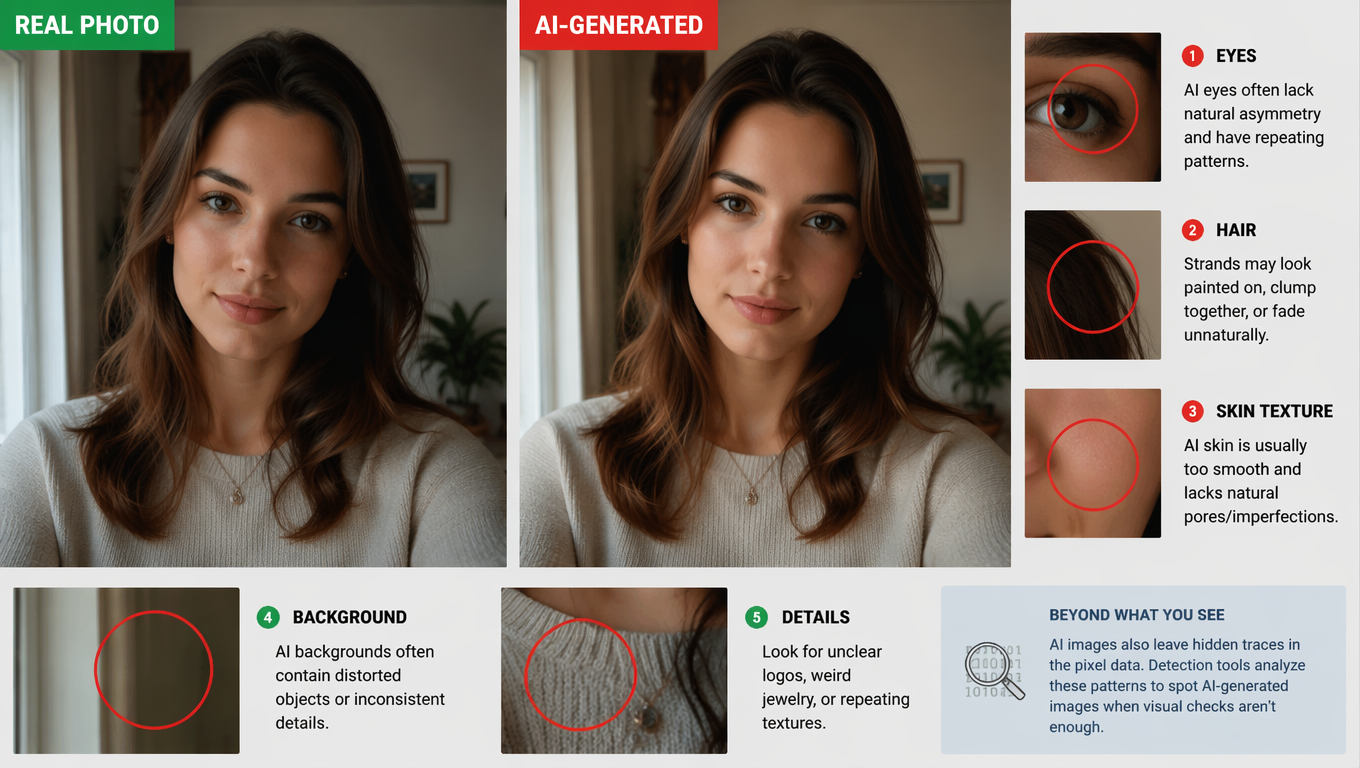
Before reaching for any tool, train your eye. These are the areas where AI still makes mistakes most often:
1. Hands, Fingers, and Jewelry
This is still the most reliable visual tell in 2026. AI has gotten better at hands, but it still struggles with complex poses — especially when fingers overlap, grip objects, or interact with rings and bracelets. Count the fingers. Check if the grip makes physical sense. Look at where rings sit relative to knuckles.
2. Eyes and Reflections
Zoom into the eyes. In a real photo, the reflections in both eyes should match — same light source, same shape, same position. AI-generated eyes often have mismatched or invented reflections. Also check if the pupils are perfectly round and identical in size, which is unnaturally consistent. For a deeper dive into facial artifacts, see How to Spot AI-Generated Images: Artifacts, Detection Methods & Defenses.
3. Text and Fine Details
If the image contains any text — on a sign, a t-shirt, a book cover — zoom in. AI-generated text often looks plausible at a glance but breaks down up close: letters merge, words don't spell anything, or the font style shifts mid-word.
4. Background Consistency
Scan the edges of the frame. AI tends to lose coherence in backgrounds — architectural details that don't connect properly, railings that merge into walls, trees with branches that loop back on themselves, or surfaces that shift texture mid-object.
5. The "Too Perfect" Quality
Real photos have imperfections: sensor noise, slight motion blur, uneven lighting. AI-generated images often have a cinematic smoothness — skin without pores, fabric without wrinkles, lighting that's dramatically perfect from every angle. If it looks like a magazine cover without trying, be suspicious.
Quick check: Drop any suspicious image into our free AI image detector for an instant analysis. No signup, no data stored — results in seconds.
How AI Image Detection Tools Actually Work
Visual inspection helps, but it has limits — especially as generators improve. That's where algorithmic detection comes in. Modern AI image detectors analyze the image at levels humans can't perceive. Here are the core techniques:
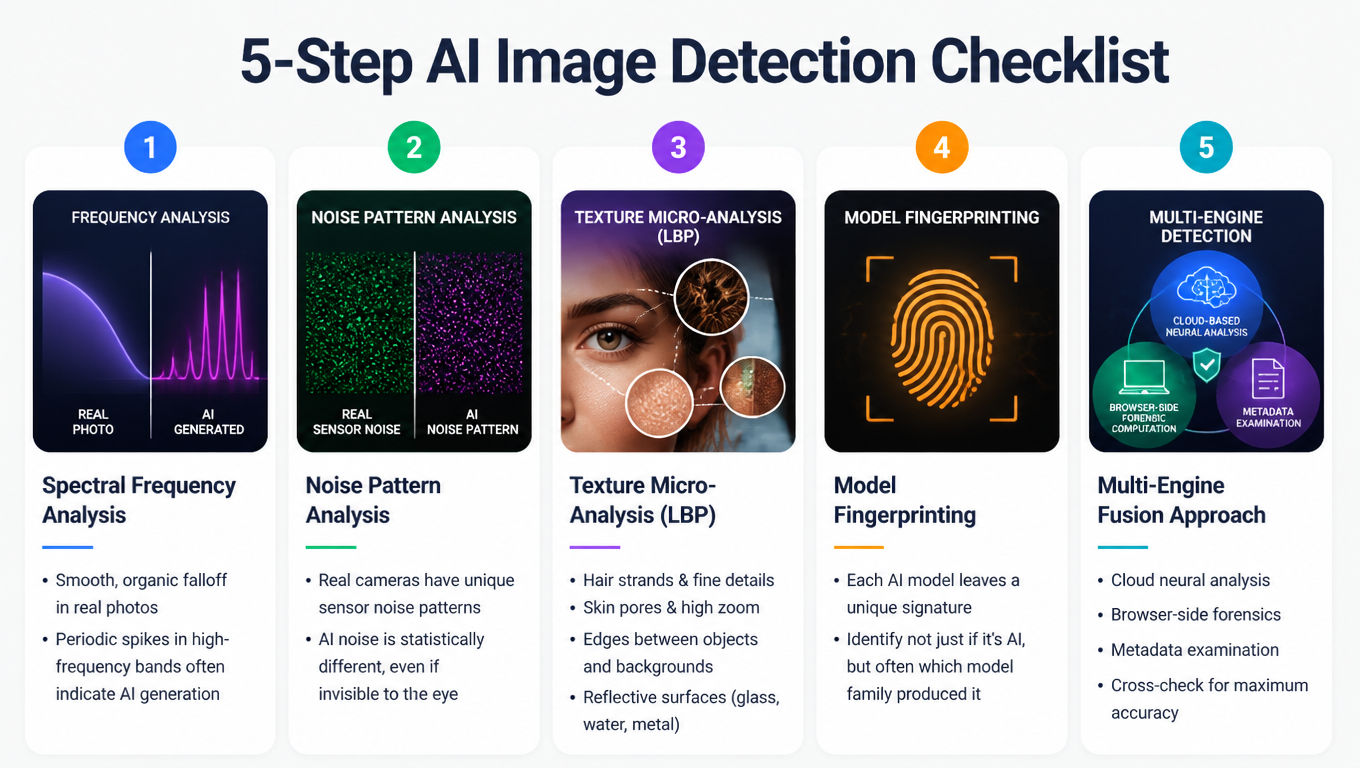
Spectral Frequency Analysis
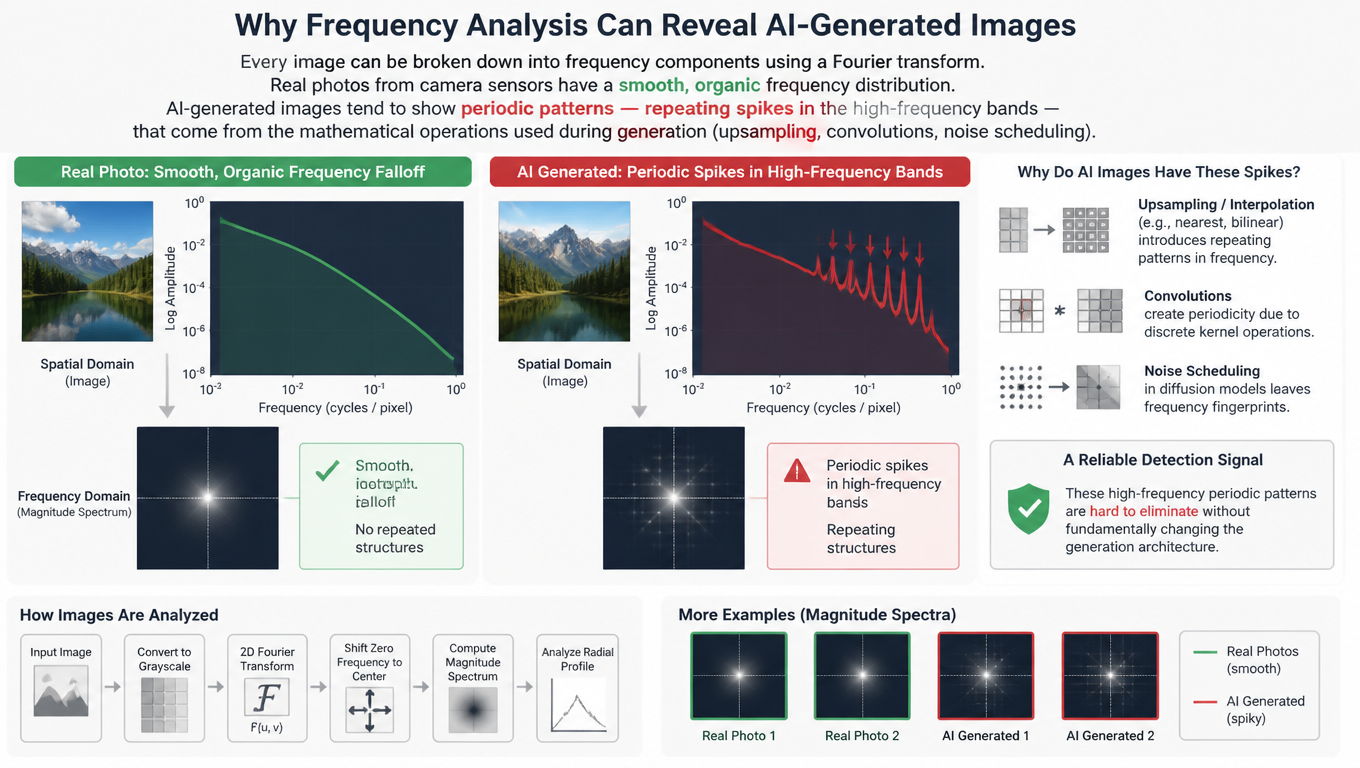
Every image can be broken down into frequency components using a Fourier transform. Real photos from camera sensors have a smooth, organic frequency distribution. AI-generated images tend to show periodic patterns — repeating spikes in the high-frequency bands — that come from the mathematical operations used during generation (upsampling, convolutions, noise scheduling).
Real Photo:     Smooth, organic frequency falloff
AI Generated:   Periodic spikes in high-frequency bands
This is one of the most reliable detection signals, because it's hard for generators to eliminate these patterns without fundamentally changing their architecture.
Noise Pattern Analysis
Every real camera introduces sensor noise — tiny random variations that follow specific statistical distributions unique to the sensor hardware. AI models don't use camera sensors, so they generate artificial noise patterns. These patterns are invisible to the naked eye, but statistical analysis can distinguish them from real sensor noise with high accuracy.
Texture Micro-Analysis (LBP)
Local Binary Pattern analysis compares each pixel with its neighbors to map micro-texture patterns. AI-generated images show subtle inconsistencies in these textures, particularly around:
- Hair strands and fine detail transitions
- Skin pores and texture at high zoom
- Edges where objects meet backgrounds
- Reflective surfaces like glass, water, and metal
Model Fingerprinting
Each AI architecture — whether it's a GAN, a diffusion model, or a transformer-based generator — leaves a unique signature in its output. Think of it like a brushstroke that identifies the artist. Modern detectors can identify these fingerprints to determine not just if an image is AI-generated, but often which model family produced it.
For a deeper look at how these methods fit into the broader research landscape — including disruption techniques and watermarking — read our companion article: How to Spot AI-Generated Images: Artifacts, Detection Methods & Defenses.
Our Multi-Engine Detection Approach
Most detection tools rely on a single analysis method, which creates blind spots. Different AI generators leave different traces, and a detector tuned for GAN artifacts might miss diffusion model outputs entirely.
At isthisaiphoto.com, we use a multi-engine fusion approach that combines three separate analysis layers:
- Cloud-based neural analysis — Deep learning models trained on millions of images across all major generator families (Midjourney, DALL-E, Stable Diffusion, Flux, and more). This catches model-specific fingerprints and learned artifacts.
- Browser-side forensic computation — Real-time local analysis that examines Laplacian Pyramid sharpness distributions, texture entropy, and noise consistency — without uploading your image to any server.
- Metadata examination — Checks EXIF data, embedded content credentials (C2PA), and steganographic markers that some generators leave behind.
By cross-referencing results across all three engines, the system catches images that would slip past any single method. Curious how this performs against the latest models? See our real-world test: Can AI Detectors Catch OpenAI's Latest Images? We Tested It.
Try it free: Upload any image at isthisaiphoto.com — you'll get a confidence score, a risk breakdown by analysis type, and a radar chart showing exactly where the image looks suspicious. No account needed.
Quick Tips by Scenario
Different situations call for different levels of scrutiny:
🔍 Dating app profile
- Check first: Eye reflections, hand poses, "too perfect" skin
- Tool tip: Run through detector — AI profiles often score 85%+
📰 News / social media photo
- Check first: Reverse image search, then run the detector
- Tool tip: Check if an original source exists before sharing
🛒 E-commerce product listing
- Check first: Background consistency, model poses
- Tool tip: Compare with other product shots from the same seller
📸 Professional headshot
- Check first: Skin texture, hair detail, earring/collar edges
- Tool tip: Detector + zoom-in visual check
🎨 Art or creative work
- Check first: Context matters more than "catching fakes" here
- Tool tip: Detector can confirm origin, but consider fair use
What Detection Can't Do (Yet)
No detector is 100% accurate. Be aware of these limitations:
- Post-processing degrades signals. Screenshots, social media compression, and heavy filtering can strip the artifacts detectors rely on. Always use the highest-quality version of the image available.
- New models outpace detectors. When a new generator architecture launches, existing detectors may not recognize its output until they're retrained.
- False positives exist. Heavily edited real photos — especially HDR, beauty-filtered, or composited images — can sometimes trigger AI detection flags.
The most reliable approach is combining automated detection with your own judgment. Use tools as a strong signal, not a final verdict.
Frequently Asked Questions
How accurate are AI image detectors in 2026?
Modern multi-engine detectors like RealPix achieve 95%+ accuracy by combining cloud-based neural analysis with browser-side forensic computation. However, no detector is 100% accurate — post-processing, compression, and new generator architectures can affect results. The most reliable approach combines automated detection with visual inspection.
Can AI detectors identify which model generated an image?
Yes. Each AI architecture (GAN, diffusion model, transformer) leaves a unique fingerprint in its output. RealPix's model fingerprinting can identify outputs from 60+ generators including Midjourney, DALL-E 3, Stable Diffusion XL, Flux, and Google Gemini (Imagen).
Is it free to check if an image is AI-generated?
Yes. RealPix offers completely free AI image detection with no signup required. Upload any image and get instant results including a confidence score, radar chart breakdown, and forensic analysis. Your images are analyzed in memory and never stored.
Can AI-generated images fool frequency analysis?
Frequency analysis is one of the hardest signals for generators to eliminate because periodic artifacts are baked into the generation pipeline (upsampling, convolutions). While newer models reduce these patterns, they rarely eliminate them entirely — and multi-engine detection catches what single-method tools miss.
Suspicious about a photo? Check it in seconds — isthisaiphoto.com is free, private, and works on images from any AI model. No signup required.
Related Reading
- How to Spot AI-Generated Images: Artifacts, Detection Methods & Defenses — The research-backed deep dive into detection, disruption, and authentication methods.
- Can AI Detectors Catch OpenAI's Latest Images? We Tested It — Real-world detection test results against the newest AI generators.
- Can Deepfakes Fool Face ID? How AI Is Breaking Facial Recognition — How deepfakes are bypassing biometric authentication systems.